
 Member Login
Target Agents Already Collaborating with Your Brokerage

Recruiting in today’s real estate market requires more than cold outreach and generic messaging. The most effective strategies are data-driven and sometimes hide in plain sight.
One of the smartest ways to recruit is by targeting cooperating buyer agents (agents from other brokerages who have already worked with your listing agents).
In this post, we’ll show you how to identify these agents and why they represent one of the highest-quality recruiting pools available today.
Why This Works
These agents have already:
- Collaborated with your team
- Experienced your processes and professionalism
- Built familiarity with your brand
Instead of starting from scratch, you’re reaching out to agents who already know you, making your recruiting efforts far more relevant and effective.
Step 1: Select the office where you want to identify agents who have represented buyers.
- Go to the Reports menu.

- Select Listing Offices.
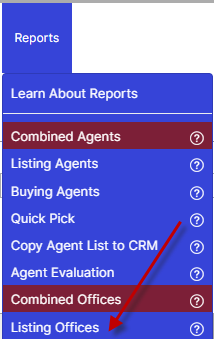
- Once the results load, click on your office name or use the search box to locate it.
- After loading the Office Drill-Down Performance page, go to Reports → Buying Agents.
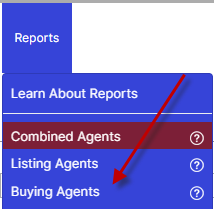
This view displays a list of agents who have collaborated on your company’s listings, including your own agents who may have co-brokered or double-ended transactions. It also shows the number of deals each agent has completed in collaboration with your brokerage.
Step 2: If you’re looking to identify the listing agents responsible for the properties your buyer agents collaborated on:
- Go to the Reports menu.
- Select Buying Offices.
- Once the results load, click on your office name or use the search box to locate it.
- After loading the Office Drill-Down Performance page, go to Reports → Listing Agents.
Step 3: Export Your Data Using the BrokerKit Template
- Once your list is finalized, look to the top of your screen for the blue Export option and click on that button.

- Enter the number of rows you’d like to export (up to 1,100 rows per day).
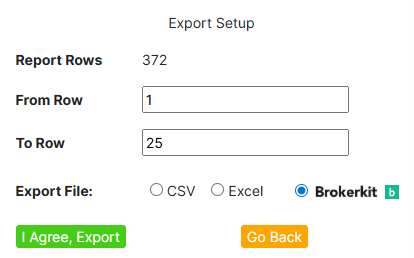
- Select the option to export using the BrokerKit Template in Excel Format. This ensures your exported file is automatically formatted for BrokerKit.
Step 4: Import to BrokerKit
- Open your exported file.
- Add in any additional data if needed.
- Do not modify the column header names. BrokerKit matches data by header name, and changing them may prevent a successful import.
- Save your file.
- Import the file into BrokerKit using their standard import feature.
Final Thought
Your next recruit may already be working with you.
By focusing on agents who have collaborated with your company, you move from cold recruiting to warm, data-backed conversations, giving you a real competitive edge.
News Articles
- April 27, 2026
- October 7, 2025
- September 15, 2025
- September 15, 2025
- November 16, 2022